AI DATING ASSISTANT

DateViser

The AI dating assistant and rizz wingman you can talk to

AI DATING COUNSELOR

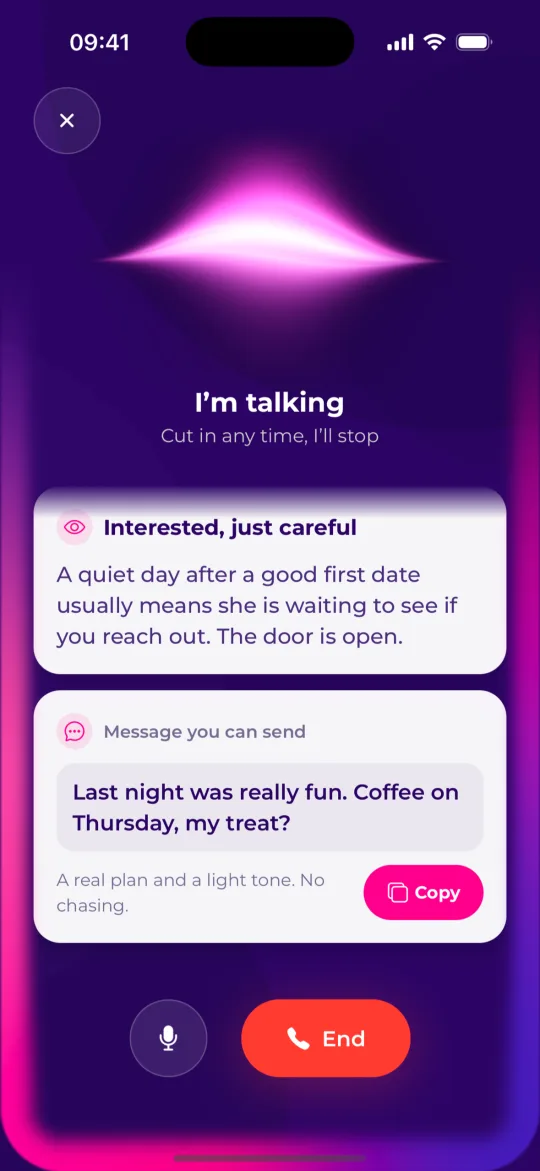
Tap once and talk it through out loud, like calling a friend who is good at this

THE WORDS, ON YOUR SCREEN

While you talk she writes the message to send, the next steps or a date plan

TURN CHATS INTO DATES

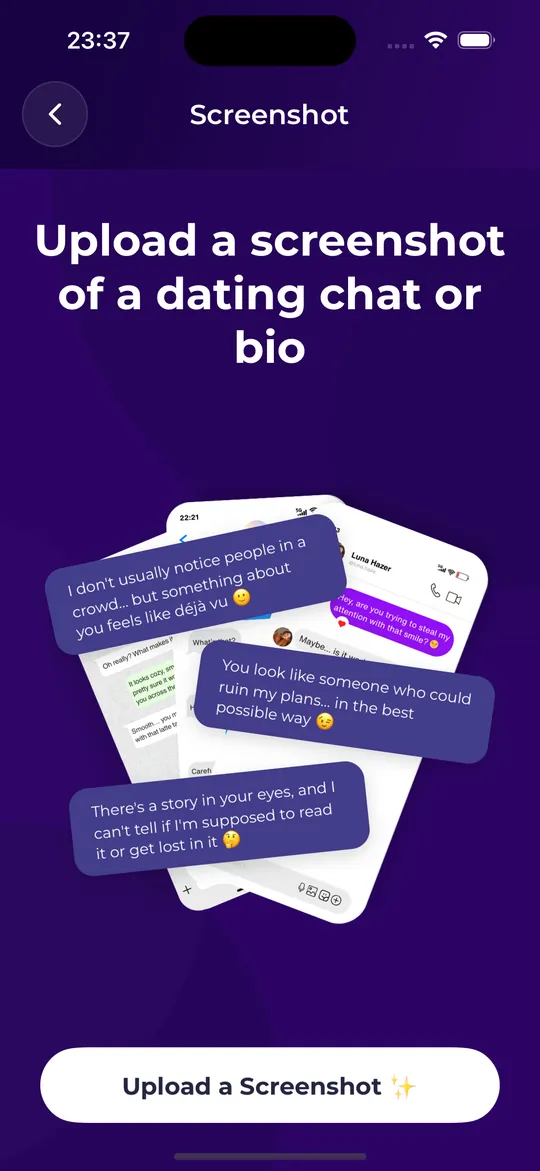
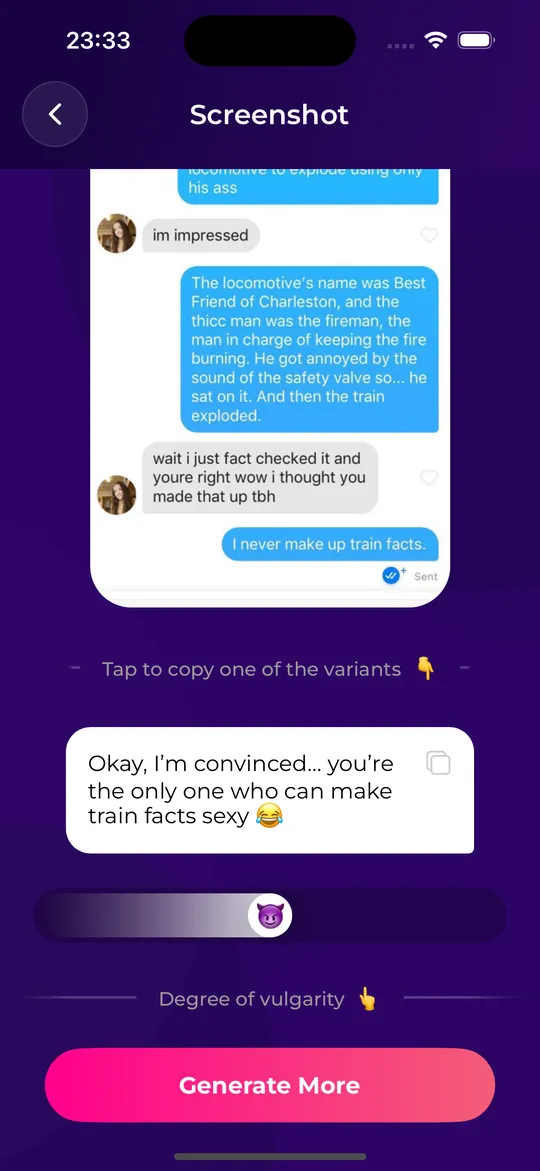
Upload a screenshot of a chat, profile or story, get a reply that fits

SMART PICKUP LINES

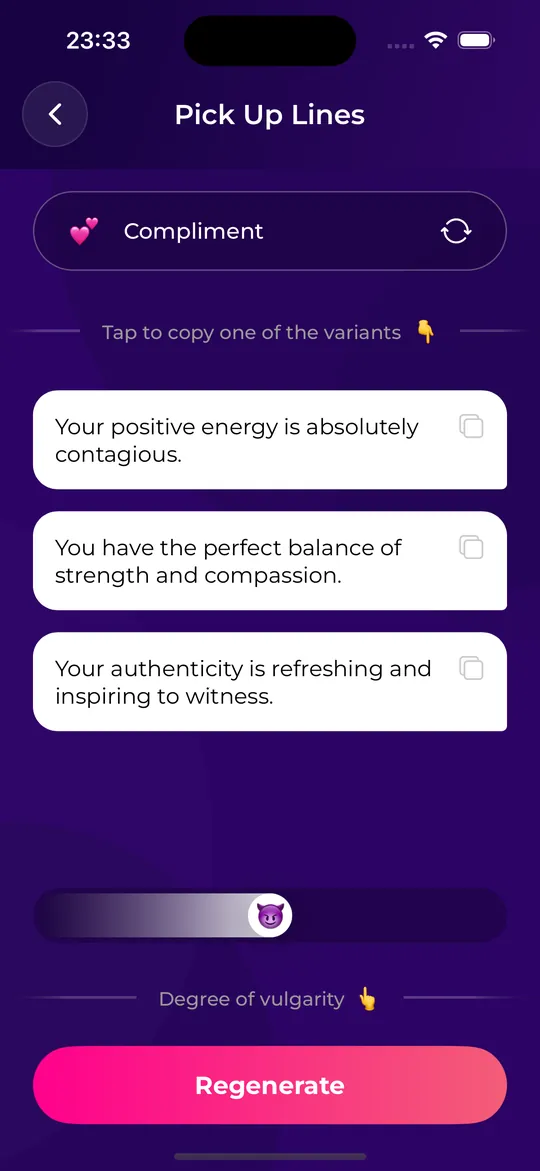
Thousands of lines by category, from sweet to bold

See how it works ↓

What is DateViser?

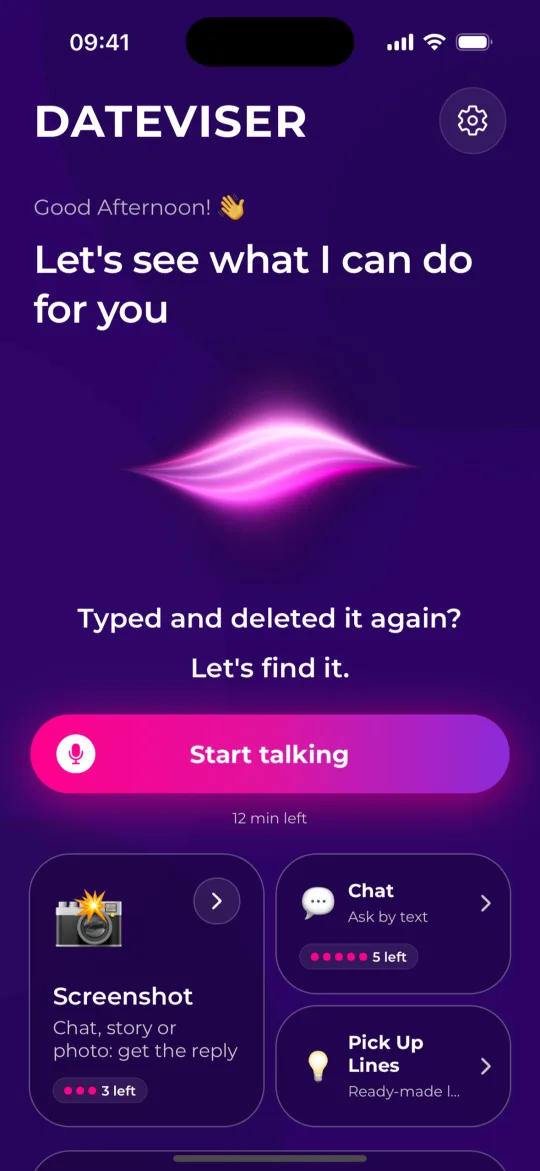
DateViser is an AI dating assistant, also called an AI wingman or rizz app, for iPhone and Android. Its main feature is an AI dating counselor you talk to out loud. You tap once and it is like calling a close friend who is good at this: she picks up with a "Hello?", you say what is going on, and she talks it through with you in real time. While you talk, she puts what you need on your screen: a message ready to copy and send, the next steps, or a date plan. You can also upload a screenshot of a conversation from Tinder, Bumble, Hinge, Instagram, WhatsApp or your text messages, and DateViser writes one ready-to-send reply that answers the last message and moves the conversation forward.

Call your counselor when you are nervous before a first date and want to know what to talk about, when you do not know what to text after a date, when you were left on read, when a conversation is going dry, or when you are wondering whether to text your ex. She remembers you between calls: your name, the people you are talking about and what is coming up, so next time she can ask how Friday went. She can play the other person so you can rehearse a hard conversation, and she can look up a real place for a date. She speaks English, Turkish, Spanish, French, Portuguese and German. The screenshot tool works on more than chats: upload a dating profile, a photo or an Instagram story and it writes an opener built on one specific detail instead of a generic "hey", at the boldness you choose on a five-level scale, from sweet to daring. If you would rather type, there is a text chat, and the app has a library of thousands of pickup lines by category.

How DateViser works

A call starts with one tap. If you would rather show than tell, upload a screenshot and get a reply in a few seconds.

Tap once to call your counselor

Open DateViser and tap Start talking. She picks up with a "Hello?" and you talk out loud, like a phone call. There is nothing to type, and no account to set up.

Say what is going on

"We had a great date on Saturday and I do not know what to text." "He saw my message two days ago." "I want to ask her out and I keep deleting it." She asks what she needs to know and talks it through with you. If you want to rehearse, she plays the other person.

Get it on your screen

While you talk, cards appear on your screen: a message ready to copy and send, a short list of what to do, a read of what their message means, or a date plan with a day, a time and a place. The cards stay on your home screen. No time for a call? Upload a screenshot of the chat, set how bold to be and copy the reply. DateViser never connects to your dating apps and never sends anything for you.

See how a call with your AI dating counselor works, with examples

See the screenshot reply step by step, with examples

What you can do with DateViser

Someone to talk it through with, and the exact words when you need them.

An AI dating counselor you can call

Tap once and she picks up. Say what is going on in your own words and she talks it through with you out loud, in real time: nerves before a first date, what to text after one, being left on read, a conversation going dry, a confusing message, whether to text an ex. She is an AI, and she says so.

Cards on your screen while you talk

You do not have to remember what she said. While you talk she puts cards on your screen: a message ready to copy and send, a short list of what to do, a read of what their message means, a profile bio, or a date plan with a day, a time and a real place she looked up. If you allow location, the places can be near you. The cards stay on your home screen.

She remembers you

Your name, the people you are talking about, what you discussed, what she suggested and what is coming up. Tell her about Friday's date and next time she can ask how it went. You do not start from zero on every call.

Practice the hard conversation first

Ask her to play the other person: cold, playful or guarded. Rehearse asking someone out, or a difficult talk, out loud. Then hear what worked and the one thing to change.

Replies from chat screenshots

Upload a screenshot of a chat. DateViser works out who said what, reads the tone and writes your next message in the language of your conversation. Set the boldness from 1 (sweet) to 5 (daring) and tap Generate More for a genuinely different idea, not a rephrasing. If the other person is pulling away or setting a boundary, it suggests a graceful reply instead of chasing.

Openers from profiles, photos and stories

Upload a profile or bio and get a first message that references one specific detail: an interest, a place, a job, a joke. For an Instagram story it writes a short, casual story reply.

A text chat, if you would rather type

Somewhere you cannot talk? The chat is still there. Ask by text about the same things: what to reply, how to ask someone out, what it means when they go quiet.

Pickup line library

Browse thousands of ready-made pickup lines in English and Turkish by category, including compliments, jokes, questions, quotes and invitations, with a boldness slider. The library is free to use.

DateViser at a glance

Category
AI dating assistant (AI wingman, rizz app, AI dating counselor, AI dating coach)
Main feature
An AI dating counselor you talk to out loud. She puts messages, next steps and date plans on your screen, remembers you between calls and can role-play a conversation so you can practice.
Also includes
Ready-to-send replies and openers from screenshots, a text chat and a pickup line library
Platforms
iPhone (iOS 15.1 or later) and Android
Price
Free to download and free to try: a little time with your counselor and a few screenshot replies each week. The pickup line library is free. Premium gives you more of both.
Works with
Screenshots from any app, including Tinder, Bumble, Hinge, Instagram, WhatsApp and text messages
Languages
The app and the counselor speak six languages: English, Turkish, Spanish, French, Portuguese and German. Screenshot replies are written in the language of your conversation.
Account
No sign-up, email or phone number required
Age rating
16+ on the App Store

Frequently asked questions

What is DateViser?

DateViser is an AI dating assistant app for iPhone and Android. Its main feature is an AI dating counselor you talk to out loud: you tap once, she picks up, and you talk through whatever is going on while the message to send or the plan appears on your screen. It also writes ready-to-send replies from chat screenshots and openers from dating profiles, photos and stories, and it includes a text chat and a library of pickup lines.

Can I talk to an AI about my dating life?

Yes. In DateViser you tap Start talking and your AI dating counselor picks up, like a phone call. You say what is going on in your own words: nerves before a first date, what to text after one, being left on read, a conversation going dry, whether to text an ex. She talks it through with you in real time and puts the message or the plan on your screen. If you would rather type, the app also has a text chat. How the AI dating counselor works.

Does the counselor remember what I told her?

Yes. She remembers your name, the people you are talking about, what you discussed, what she suggested and what is coming up, such as a date on Friday. Next time you call she can ask how it went, and you do not have to explain everything again. You can make her forget everything in Settings.

Can I practice a conversation before I have it?

Yes. Ask your counselor to play the other person. She can be cold, playful or guarded, so you can rehearse asking someone out or a difficult conversation out loud. Afterwards she tells you what worked and one thing to change.

Is the counselor a real person?

No. She is an AI dating counselor, and she says so. A call feels like talking to a friend on the phone, but there is no human on the line.

Is DateViser free?

DateViser is free to download and free to try: you get a little time with your counselor and a few screenshot replies each week, and the pickup line library is free. Premium gives you more of both. The current price and any free trial are shown in the App Store or Google Play before you subscribe.

Which dating apps does DateViser work with?

All of them. Your counselor works from what you tell her, so it does not matter where the conversation happened. The screenshot tool reads screenshots, so it works with Tinder, Bumble, Hinge, Instagram DMs, WhatsApp, text messages and any other app you can take a screenshot of. DateViser does not connect to your accounts.

Is DateViser safe? What happens to my screenshots?

You do not need an account, email or phone number. When you upload a screenshot it is sent over an encrypted connection to DateViser's server and to our AI provider to write your message. Your counselor remembers what you tell her so you do not have to repeat yourself, and you can make her forget everything in Settings. To ask for your data to be deleted, you can also email [email protected]. Full details are in the Privacy Policy.

Does DateViser send messages for me?

No. DateViser never connects to your dating accounts and never sends anything. Your counselor and the screenshot tool give you a message to copy, and you decide whether to send it, edit it or ask for another one.

What languages does DateViser support?

The app and your counselor speak six languages: English, Turkish, Spanish, French, Portuguese and German. Screenshot replies are written in the language of your conversation: if the chat in your screenshot is in Italian, the suggested reply is in Italian. The pickup line library is in English and Turkish.

Can I control how flirty the messages are?

Yes. In the screenshot tool and the pickup line library, a boldness slider goes from level 1 (sweet and wholesome) through level 3 (openly flirty) to level 5 (daring adult humor). At every level DateViser avoids crude or degrading lines, and if the other person has said no or asked for space it suggests a respectful reply whatever level you picked.

How is DateViser different from asking ChatGPT?

ChatGPT is a general assistant for almost any question. DateViser is built for dating. You talk to a counselor who remembers your situation, puts copy-ready messages and date plans on your screen and lets you rehearse a conversation out loud. And when a chat is open, it reads the screenshot itself, works out who said what and gives you one short, natural message you can paste, with a boldness control and a Generate More button that produces a different idea each time. Full comparison: DateViser vs ChatGPT.

Will the other person know I used AI?

DateViser adds nothing to your messages and the other person only sees what you send. Messages are written to sound like a real person typing on a phone: short, specific to your conversation and free of cliché pickup templates. They work best when you treat them as a draft and add your own voice.

How do I cancel DateViser Premium?

Subscriptions are managed by Apple or Google, not inside DateViser. On iPhone open Settings, tap your name, then Subscriptions. On Android open Google Play, then Payments and subscriptions.

How do I contact DateViser support?

Email [email protected] or visit the support page. We usually reply within 24 hours.
Works with the apps you already use

Guides and reply examples for the places dating actually happens.

Dating app texting guides

Practical guides with example messages you can adapt and links to the research behind them.

What to Say in a First Message on Tinder, Hinge or Bumble (With Examples)

The first message formula that gets replies on dating apps: one specific detail, your take on it and an easy question, with 15 examples you can adapt.

How to Reply to "Hey" on a Dating App (12 Examples)

What to say when a match opens with just "hey" on Tinder, Hinge or Bumble: 12 replies that add a topic and get a real conversation going.

How to Restart a Dead Conversation on a Dating App (Without Seeming Desperate)

What to text when a dating-app chat went quiet: four kinds of message that restart a conversation, 12 examples, and the one-follow-up rule.

How to Ask Someone Out Over Text (Without Making It Awkward)

A simple formula for asking a match out by text: a callback, a specific plan and an easy out, with examples and replies for "maybe" and "I'm busy".

What to Text After a First Date (And When to Send It)

When to text after a first date and what to say, with examples for a great date, an unsure one and a polite no, backed by Hinge's 2025 survey data.

AI Dating Assistant Apps Compared: How to Choose One in 2026

AI dating assistants (rizz apps, AI wingmen) compared: what DateViser, YourMove AI, RIZZ, WingAI and Plug AI read, offer and charge, and what to check first.

What to Say on Tinder When They Have No Bio (20 Openers That Work)

A Tinder profile with photos and nothing else still gives you plenty to open with. 20 first messages built from a photo, a name, a job or an Anthem, and the ones to avoid.

Tinder Match Not Replying? 7 Messages That Restart the Chat (and When to Stop)

Your Tinder match went quiet. What to send after 2 days, after a week, and after they never replied to your opener, with 15 messages that reopen a chat without sounding like a follow-up.

How to Reply to an Instagram Story to Start a Conversation (25 Examples)

Story replies are the easiest way to open a conversation on Instagram, if you say more than a fire emoji. 25 replies for food, travel, selfie, pet, gym and text stories, and the ones that get left on seen.

Left on Seen on Instagram? What to Send Next (and What Not To)

They read your DM and didn't reply. What 'seen' actually means, how long to wait, 12 messages that restart the chat without mentioning the silence, and the point where you stop.

Bumble First Message Examples for Women (Before the 24 Hours Run Out)

On Bumble the match expires in 24 hours if you don't write first. 22 openers built from prompts, photos and badges, ranked by how easy they are to answer, plus what to do when he replies with one word.

What to Say on Bumble After He Replies (Second Messages That Keep It Going)

You opened, he answered. Now what? 18 second messages for Bumble: when he answers well, when he answers with one word, when he asks a boring question back, and how to move toward a date.

Hinge Prompt Comments That Get a Reply (Examples by Prompt Type)

On Hinge your first message is a comment on a prompt. 24 comment examples sorted by prompt type: two truths and a lie, typical Sunday, I'll fall for you if, my simple pleasures, and more.

How to Reply When Someone Comments on Your Hinge Prompt (15 Examples)

They liked your prompt and left a comment. The reply decides whether it becomes a conversation. 15 replies for good comments, flat ones, jokes and questions, plus the second message that keeps it going.

DateViser vs ChatGPT: Which Is Better for Dating App Replies?

Can you just use ChatGPT for dating replies? An honest comparison of what each reads, what you get back, privacy and price, and when to use which.

How to Practice Asking Someone Out (Out Loud)

How to practice asking someone out by saying it out loud: set up a rehearsal, run through a yes, a maybe and a no, and fix what you hear in your own delivery.

How to Have the "What Are We?" Talk (Without an Ultimatum)

How to have the "what are we?" talk: when to bring it up, how to open without an ultimatum, what the common answers mean and what to say back.

First Date Nerves: What to Do in the Hour Before

Nervous before a first date? A routine for the last hour, three topics to have ready, how to get through the first two minutes and what to do if you go blank.

Can You Talk to an AI About Your Relationship?

Yes, you can talk to an AI about your relationship. What it is good for, what it cannot do, how to get useful answers and when to see a human professional.